When you zoom in on nutrition facts for vegan “butters,” the health differences usually come down to two things:

1.	Saturated fat per tablespoon (the biggest lever). The American Heart Association recommends keeping saturated fat under 6% of daily calories.  The Dietary Guidelines for Americans recommend keeping saturated fat under 10% of daily calories.
2.	Sodium per tablespoon (secondary, but it adds up if you use a lot). The Daily Value for sodium is < 2,300 mg/day.

Most vegan butters get their “butter-like” performance from tropical fats (coconut, palm, palm kernel), which tend to push saturated fat up. So “healthiest vegan butter” usually means: lowest saturated fat while still tasting good, and no partially hydrogenated oils (modern mainstream options are typically 0g trans fat).

How I ranked these

Rank order is primarily by:

•	Lower saturated fat (g) per 1 tbsp serving (most important)
•	Then lower sodium (mg)
•	Then ingredient profile (more unsaturated oils like canola/olive/high-oleic sunflower is a plus; very long additive lists are a small minus)

A quick heads-up: brands sometimes change formulas. If something is a “forever staple” for you, double-check the package label once.

Ranked recommendations (health-first)

1) Earth Balance Olive Oil Buttery Spread (tub)

Why it ranks #1: Lowest saturated fat tier while keeping a butter-like feel; moderate sodium.

•	Per 1 tbsp (11g): 80 cal; 2g sat fat; 75mg sodium
•	Ingredients (high-level): oil blend includes palm fruit + canola + safflower + flax + extra virgin olive oils, plus water, salt, pea protein, lecithin, lactic acid, annatto.

Best use: Toast, finishing veggies, everyday spreading (less ideal if you need a perfect “butter stick” for pastry structure).

2) I Can’t Believe It’s Not Butter! It’s Vegan (tub)

Why it ranks #2: Same low saturated fat tier, and it’s also lighter in calories and total fat; slightly higher sodium and more “spread” than “butter.”

•	Per 1 tbsp (14g): 60 cal; 2g sat fat; 90mg sodium
•	Ingredients (high-level): water + soybean oil + palm/palm kernel oils, salt, soy lecithin, vinegar, flavor, added vitamin A, beta carotene color.

Best use: Spreading and light cooking. (It’s not my first pick for laminated pastry-style baking.)

3) Earth Balance Original Buttery Spread (tub)

Why it ranks #3: Next tier up on saturated fat; still reasonable compared to many stick-style vegan butters.

•	Per 1 tbsp (14g): 100 cal; 3g sat fat; 105mg sodium
•	Ingredients (high-level): palm + canola + soybean + flaxseed oils, plus water, salt, pea protein isolate, lecithin, lactic acid, annatto.

Best use: General-purpose tub spread; decent all-rounder.

4) Earth Balance Soy Free Buttery Spread (tub)

Why it ranks #4: Same saturated fat tier as #3, but a bit higher sodium; good if you’re avoiding soy.

•	Per 1 tbsp (14g): 100 cal; 3g sat fat; 110mg sodium
•	Ingredients (high-level): canola + safflower + flaxseed oils plus palm oil, water, salt, natural flavor, pea protein isolate, sunflower lecithin, olive oil, lactic acid, annatto color.

Best use: Soy-free everyday spread.

5) Melt Organic “Original Spread” (tub)

Why it ranks #5: Moderate saturated fat, relatively moderate sodium; ingredient list is fairly straightforward for this category.

•	Per 1 tbsp (14g): 80 cal; 3.5g sat fat; 80mg sodium
•	Ingredients (high-level): organic coconut oil + sustainable palm oil + organic canola + organic sunflower oil, water, sea salt, rosemary extract, sunflower lecithin, annatto color.

Best use: Spreading + cooking where you want a clean-ish ingredient profile.

6) Country Crock Plant Butter Spread (tub) with Avocado Oil

Why it ranks #6: Higher saturated fat than the top spreads; very common brand, easy to find.

•	Per 1 tbsp (14g): 100 cal; 4g sat fat; 105mg sodium
•	Ingredients (high-level): soybean + palm kernel + avocado + palm fruit oils, water, salt, pea protein, soy lecithin, lactic acid, flavors, tocopherols (vit E), vit A, beta carotene.

Best use: “Mainstream grocery” option that behaves reliably.

7) Country Crock Plant Butter Spread (tub) with Olive Oil

Why it ranks #7: Essentially the same nutrition tier as #6; olive oil is present, but saturated fat is still in the 4g range.

•	Per 1 tbsp (14g): 100 cal; 4g sat fat; 105mg sodium
•	Ingredients (high-level): soybean + palm kernel + palm fruit + olive + extra virgin olive oils, plus water, salt, pea protein, soy lecithin, lactic acid, flavor, tocopherols, vit A, beta carotene.

Best use: Same as #6, just a different flavor profile.

8) Miyoko’s Oat Milk Butter, Salted (tub)

Why it ranks #8: Same saturated fat tier as many stick products, but lower sodium than most; palm-oil-free if that matters to you.

•	Per 1 tbsp (14g): 80 cal; 4.5g sat fat; 70mg sodium
•	Ingredients (high-level): high-oleic sunflower oil + cultured oat milk + coconut oil, lecithin, sea salt, mushroom extract, flavors, vegetable/fruit juice + turmeric for color.

Best use: If you want a “nicer” taste and a more premium vibe, while staying mid-pack on saturated fat.

9) Melt Organic Salted Plant Butter Sticks

Why it ranks #9: Stick format tends to increase saturated fat versus the lowest-sat tubs; still reasonable sodium.

•	Per 1 tbsp (14g): 80 cal; 4.5g sat fat; 80mg sodium
•	Ingredients (high-level): organic sustainable palm + canola + coconut + sunflower oils, water, sea salt, sunflower lecithin, annatto color.

Best use: Baking and cooking where stick performance matters.

10) Good & Gather Plant-Based Organic Non-Dairy Salted Buttery Sticks (Target)

Why it ranks #10: Similar nutrition profile to other sticks; very easy to buy in Minneapolis because it’s Target’s house brand.

•	Per 1 tbsp: 80 cal; 4.5g sat fat; 80mg sodium
•	Ingredients (high-level): water + organic refined coconut oil + organic sunflower oil + organic palm oil, sea salt, lecithin, “natural flavor,” tocopherols, annatto color (Target listing).

Best use: Best “easy-to-find + affordable” stick option.

Products I would not call “health-forward” (but you may still like them)

These are more “butter-mimic” than “health-leaning” because saturated fat climbs.

•	Violife Plant Butter, Salted: 100 cal; 6g sat fat; 85mg sodium per tbsp; includes canola + coconut + sunflower oils and faba bean protein.
•	Country Crock Homestyle Dairy Free Butter, Unsalted (sticks): 100 cal; 6g sat fat; 0mg sodium; oils include palm fruit/palm kernel/canola.
•	Miyoko’s European-Style Cashew Milk Butter, Unsalted (sticks): 90 cal; 8g sat fat; 0mg sodium; coconut oil is the big saturated fat driver.

If you’re switching from dairy butter mainly for heart-health reasons, these three behave most like dairy butter in the body (saturated-fat-wise), even though they’re vegan.

What to buy in Minneapolis if you want “healthy-ish” and enjoyable

If your goal is “health-first, still tastes like a butter spread”:

•	Start with Earth Balance Olive Oil Buttery Spread (#1) for everyday toast/finishing.
•	Keep I Can’t Believe It’s Not Butter! It’s Vegan (#2) as a lighter-calorie spread option.
•	If you bake a lot, keep one stick around, but treat it as a “use deliberately” fat: Good & Gather sticks (Target) or Melt sticks.

Practical label checklist (fast, works in any grocery store)

When you’re standing at the dairy case comparing tubs and sticks:

1.	Saturated fat: try to stay at 2–3g per tbsp if “health-first” is the mission. (Many sticks are 4.5–8g.)
2.	Trans fat: should be 0g, and avoid “partially hydrogenated” in ingredients.
3.	Sodium: if you use it a lot, aim closer to 70–90mg per tbsp rather than 105–110mg.
4.	Oil mix: more canola/olive/high-oleic sunflower generally helps keep saturated fat down; coconut/palm tend to drive it up. (Tropical oils are a common saturated fat source.)

If you want an even healthier “butter-like” habit

If your real goal is “a satisfying fat on bread,” the biggest health upgrade is often rotating:

•	Use extra-virgin olive oil (dip with salt/pepper), or
•	Avocado (mash + salt), or
•	Hummus for savory,

and keep vegan butter for when you truly want butter flavor.

Slack Canvases are a great way to share information quickly and cleanly, but unfortunately they aren’t available for mobile creation yet.

Since you want something simple and easy to use on your phone, here are a few alternatives that capture the spirit of Slack Canvases:

1. Google Keep:

  • Pros: Super simple and user-friendly, great for quick notes, lists, and even audio recordings. You can add images and drawings too. Easy to share with a link.
  • How it’s like Canvases: Focuses on visual organization of information in a clean format.
  • Sharing: Generate a shareable link that lets others view and even collaborate on the note.

2. Simplenote:

  • Pros: Clean, distraction-free interface, focuses on text-based notes, available on many platforms.
  • How it’s like Canvases: Prioritizes clarity and conciseness, making information easy to digest.
  • Sharing: Share a link for viewing or collaboration.

3. Apple Notes (if you’re on iPhone):

  • Pros: Comes built-in, simple to use, supports basic formatting, checklists, and attachments.
  • How it’s like Canvases: Easy to organize notes visually with thumbnails.
  • Sharing: Share a link with various permission levels (view only, collaborate).

4. Pinterest (for a more visual approach):

  • Pros: Excellent for visual collections and mood boards.
  • How it’s like Canvases: Organizes information visually using images and short descriptions.
  • Sharing: Share boards or individual pins with others.

5. Milanote (for creative projects):

  • Pros: Designed for organizing creative projects, allows you to arrange images, links, text, and more on a flexible canvas.
  • How it’s like Canvases: Offers a free-form canvas for arranging information visually.
  • Sharing: Share boards with collaborators or publicly.

Tips for “Canvas-like” Simplicity:

  • Use headings and bullet points: Break up information for easy scanning.
  • Add visuals: Images, drawings, or even emojis can make your document more engaging.
  • Keep it concise: Focus on the most important information.
  • Use a clear layout: Organize information in a logical way.

Hopefully, one of these options will work well for your needs!

The fix was to do as follows (note that this will reset your Safari preferences, so anything special you have set will need to be reset):

  1. Close Safari.
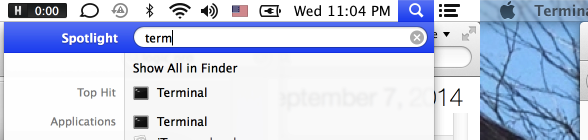
  2. Open up the Terminal app (start typing “Term” in the spotlight).
    Screenshot 2014-09-03 23.04.38
  3. Type “cd ~/Library/Preferences/” without the quotes
  4. Type “mv com.apple.Safari.plist ~/” without the quotes
  5. Restart Safari. Voila.

Seth Godin wrote blog post today on conference call “hygiene.” I couldn’t agree more with what he says, as usual. This blog post brought up a reader’s perceived necessity of long-duration conference calls in telecommuting companies. What’s a telecommuting company, you ask? I’d posit that it’s any company with a significant percentage of the workforce that works remotely. Ok, so how does telecommuting actually go down?

Here’s an incorrect equation, for starters:

telecommuting == conference calls

Bzzzzt! Wrong answer. It doesn’t matter if your company is not in the tech industry – there is no excuse not to take advantage of the plethora of telecommute-enhancing technologies that are readily available. As soon as you start introducing telecommuting into your business operations, you automatically need to increase your company’s technical infrastructure in order to remain productive and effective. And, it doesn’t have to be a big deal.

Beg for forgiveness; don’t ask for permission.

The best way to improve your telecommuting tech infrastructure is to just try things out. Don’t have another series of conference calls with Head of XYZ Department and their subcommittees. Find out what works for you and your team(s). Nine times out of ten, if you find the right person with the proper power and a company credit card, they can make things happen – maybe that person is even you.

Try out technologies on small projects before bringing it to your mega e-commerce production team, and then get others onboard. Investigate what some of the top companies in the tech industry are using, and then try out those technologies. What’s more, several of the technologies that improve telecommuting are either free or offer free trials.

Ok, so what are some of these technologies? Here are some of my favorites, many of which we use at the Drupal web/creative agency that I own, Origin Eight.

Basecamp – An online portal that is engaging and easy to use for even the most non-technical users, since it can optionally be quite email-driven. Set milestones; keep track of who’s doing what; don’t let another email get lost – keep your (searchable) discussions in Basecamp; document things; keep all of your project-related files attached to a single project; attach Google Docs; forward emails to Basecamp for those people who refuse to use it (at first). It’s life-changing, purposefully simplistic, and something I use to track pretty much every longer-term thing in my daily life. Need more features for managing larger-teams? Try Roadmap, which integrates with Basecamp and adds all the fancy Gantt charts, resource scheduling and things, or one of the many other integrations or “extras“.

Google Hangout – When you really need face-to-face time virtually, try this out instead of a conference call. A conference call is like this awfully hilarious-yet-accurate video; Google Hangouts are a bit better.

join.me or Skype – I like the user interface and overall user experience of join.me much better for conference calls involving visual demos and screen sharing (even better than WebEx, potentially), whereas Skype offers a more multimedia-rich chat client that is universally adopted around the world. If you’re going to do extended group chat or have a longer call, at least share your screen or guide everyone through something visual in order to make the conversation useful to the group.

Hipchat – For any teams that require group communication yet are already quite overloaded with email…just start using it. I’m serious — download it and invite a few people and give it a try. Now! There is no better group chat client that I’m aware of. Yes, there is IRC; yes, Yahoo and everyone else offers some version of group chat. This, however, is different. You can invite people who aren’t on Hipchat into a public room to chat about something in 2 minutes that might require 20 emails or a 20-minute conference call. You can configure how and when it notifies you, including on your smartphone as a push notification. You can break out conversations into separate rooms, controlling privacy and focusing discussion to relevant parties, all while maintaining a persistent chat history. Just. Download. It. Yes, it costs money – are you one of those people who uses a free conference call service that inspired the video I referenced above? Get some money in the budget for Hipchat for next year.

Google Chat – Use a nice chat client like Messages for Mac or Adium for Windows along with something like Google Chat. Yes, keep the corporate chat app running if your company requires you to use one, but then chat with your team however you’re most comfortable to Get Things Done, as long as the information you’re discussing doesn’t have word-altering security implications.

Google Apps – Turn on two-step authentication and use Gmail, Google Docs, Calendar, and the plethora of apps available. Set up filters in Gmail to screen out or categorize email. Don’t email around documents for editing – use Google Docs to collaboratively edit. Another nice related solution is that which Zoho offers.

CRM – A Customer Relationship Management tools is important for sales leads. Don’t have a call to discuss leads – track them, and then communicate and schedule through the CRM. Some nice CRM solutions are Highrise, Sugar CRM, Zoho, Salesforce…there are many. Try one out and see which is best for your company. I personally like Zoho CRM as it offers good functionality at a great price (free to start) for smaller businesses, as well as Highrise for its 37 SIgnals (Basecamp) integration.

Box or Dropbox for Business – Share files. Don’t email them. Basecamp isn’t a proper storage archive for certain types of files, and Google Drive can be cumbersome and less-easily adopted. Use a service such as these to share files with your team, and keep them in one place. Oh, and don’t store super-secure information here unless you have an encrypted, password-protected hard drive: if your computer is stolen, so are your files.

Passpack – Email is unsafe and prone to hacking. Don’t email passwords. Google Docs are unsafe unless everyone has 2-step verification enabled; and even then, still iffy. Share passwords and other important credentials securely with something like Passpack.

DoneDone – Use a bug or task tracker if you are in the software industry. Don’t email tasks and bugs to your developers in spreadsheets, and then send hundreds of emails clarifying the things you send in the spreadsheet. They will want to die. DoneDone is highly user-friendly, has enough features for the great majority of companies (don’t overwhelm project managers and producers with overly-complex bug trackers that have fields they don’t use and functionality that makes them frustrated to the point that they email things to developers in spreadsheets). Also, if you have them, you can involve technical clients in the QA process if you use something nice and friendly like DoneDone. Asana is also a really, really amazing tool for task tracking, if Basecamp doesn’t make sense in certain contexts, and if DoneDone feels too technical. Some people like Trello, too.

An intranet – There is no link here, since there are so many. Get an intranet, and document things like policies, the technology you use, information that you would otherwise have to onboard or convey to new people during conference calls. Use Google Sites. Confluence. Open Atrium. The list goes on. Get one, get people onboard and adopting it, and use it. Document important things.

Honorable mentions – Use something like Rightsignature (my favorite thus far) or PandaDoc (still new but very promising) for signing and sending templated legally binding documents to and from your remote workforce and clientele. Seriously, don’t type up, scan, manually sign and do all that crap by hand. Stop it. Also, for time-tracking, I recommend Harvest. For invoicing you really ought to try Freshbooks. Campfire might work for some people instead of Hipchat. Onboarder is also a really neat web app for onboarding new talent, so that you can create checklist tasks for the new person as well as your staff, centralize info relevant to onboarding, and even automatically create new user accounts in various integrated apps. This could save several introductory conference calls. There are many more that might help remote workers for your particular business – give the internet a surf!

Use the right tool for the right job. Don’t expect any one tool to do everything. –Me

In summary, based on my experience, I find that long-duration conference calls are a result of a lack of modern infrastructure. People seriously use free conference call providers in order to save the company a few dollars on a conference call that is costing the company hundreds or thousands of dollars in lost productivity and forfeited time. This thinking is backwards, unsustainable, and inconsiderate of any telecommuting company to its workforce and stakeholders. Build some level of telecommuting infrastructure, and then have company policies and documentation to support your infrastructure.

I find that a great number of conference calls are often organized by wishful thinkers who are so overwhelmed by email already that they hope and pray that a conference call will take less time and be less overwhelming than their inbox; but, in reality, it’s just a break in their day to switch away from email that they impose on everyone else. Ask your company for help in delegating some of your duties if you are truly that overwhelmed. Even a $15/hr Craigslist intern. And then work on how you can delegate. This very infrastructure will help you delegate. I bet you could give that intern this article, set them on a technology demo spree, have them set you up with the most promising ones, and proceed to save your company an exponentially greater and increasing amount of time and money.

Action templates

June 4, 2013 — Leave a comment

Maybe there’s a better name for it, but the idea is this: sometimes a to-do item is repeating, and it involves several tasks that should all occur at once. As an example, here is an action template for day-of Facebook promotions for a recurring set of networker events:

My Facebook status: @EVENT_NAME is tonight — see you there! (target appropriate lists)

Post in Twin Cities group: @EVENT_NAME is tonight — a networker-like event with free apps and fun people. See you there!

Message to Event Council members: Hey everyone! If you wouldn’t mind updating your status or finding some other means of reminding your friends about tonight’s event, that would be stellar. Thanks, and see you soon!

This is something that should be done in batch, but you shouldn’t really shouldn’t need to plug all of this into your to-do or reminder app. You should just be able to reference this template name by title. I’ve written about Notational Velocity before — in this case, I’d just make an entry in Notational Velocity called “Networker Events: Action Template: Day-of Facebook promotions”. In order to remind myself and ensure that I do this on the day-of, I’d just paste the text “Networker Events: Action Template: Day-of Facebook promotions” into my reminder app Due, and, by its very structure, I’d know what it means and how to easily find it by typing “Networker Action Template” into Notational Velocity.

sethviebrock's avatar

Just learned about https://petitions.whitehouse.gov/ today. It’s built in Drupal and allows direct petitioning to the US government. Now, they’re opening up an API so that 3rd party applications (such as change.org) can write to this petition data and collect signatures – currently there is already a read-only API in place. Very cool!

Do you find yourself writing the same things over and over again? This is a simple yet powerful tip: save and label what you write. As a Mac user I personally use Notational Velocity to store text for emails, events that I create on Facebook, business opportunity outreach, and the list goes on. Templated text is just a quick search & copy-paste away.

Here’s an example of templated text in Notational Velocity that I use to address vague bug reports, which I paste into emails, bug tracking software and project management portals:

Image

Using templates is part of a larger psychological barrier – taking time now to save time later. Thinking of your actions as a series of templates is not easy to do and requires practice and dedication. What can you do now to save time later?

Yes, Drupal is my favorite platform for everything but…blogging. I use Drupal to build and maintain a wide array of sites, but what I don’t have time for is worrying about Drupal while I’m blogging. Granted, DrupalGardens.com is one answer to wordpress.com, but, at least for the purposes of this blog, I just want to blog – not build – and there are several user experience things that WordPress gets done just a bit better. I want it to work well, worry-free, because I’m an extremely busy executive who, when it comes to blogging, needs things to Just Work. Also, I’m curious as to how WordPress does things, and want to experience it fully, first-hand. If I get to the point where I’m really craving Drupal again, it looks like Drupal Gardens has a WordPress content import option 😉

Oh, when I’m not talking about business or technology, I also like to live and contribute to life – both mine and others. So, I started a blog to expose the intersections of life, technology, business, art, productivity…such lists are always so finite…so, I’ll just write about intersections.